Your business assistant

Run your business from one place.

Talk to Tony like you would to a sharp assistant. He builds a landing page, plans your social posts, prepares a presentation, chases unpaid invoices and runs your weekly routines, and he asks before anything goes out. Customers, money, marketing and your team, in one interface.

Works in the browser on desktop and phone. English, Hebrew, Spanish, Portuguese and French. Already have an account? Log in.

The Hey Tony AI home screen on a phone: Ask Tony box with a microphone, unpaid invoices, pending approvals and automations
  • You approve before anything goes outEmails, reminders and posts wait in Approvals. Tony can't approve for you, even by voice.
  • One place for the daily workCustomers, money, tasks, bookings and routines, instead of five tabs and a notebook.
  • Type it or say itPress the mic, check the transcript, then send. Tony can read answers aloud.

Just ask Tony

Talk to Tony like you would to a sharp assistant

Type it or say it. Tony does the work, shows you the result, and asks before anything reaches a customer.

Build me a landing page for the Passover sale
TonyI built it. Here is the preview; tell me what to change.
Beta
Plan next week's posts for Facebook and Instagram
TonyI wrote 6 posts and put them on your content calendar as drafts. Nothing is published until you approve.
Beta
Who hasn't paid this month?
TonyYou have 3 open invoices, $918.00 in total. Pick one and I will prepare a reminder.
Available
Make a 6-slide presentation for Monday's team meeting
TonyDone. The PowerPoint file is ready to download in the chat.
Beta
Write a newsletter to my customers about the new opening hours
TonyThe draft is waiting in Content. Nothing is sent until you approve it.
Beta
Every Monday at 9, send me a summary of customer questions
TonyScheduled: every Monday at 9:00 in your time zone. You can pause it anytime.
Available
Answer today's customer emails
TonyI drafted 4 replies to customer questions. Each one waits for your approval.
Beta
Write a Word document with our refund policy
TonyHere is the document, ready to download from the chat.
Beta
Give Sarah access to customers and bookings only
TonyOpen Team, invite Sarah, and pick the areas she can see. Everything else stays private.
Available

Requests marked Beta need a connected account or are still in testing. The full, honest list is below.

Core capabilities

The work that keeps a small business running

Built for owners who do the selling, the billing and the follow-up themselves.

Know who owes you, and remind them politely

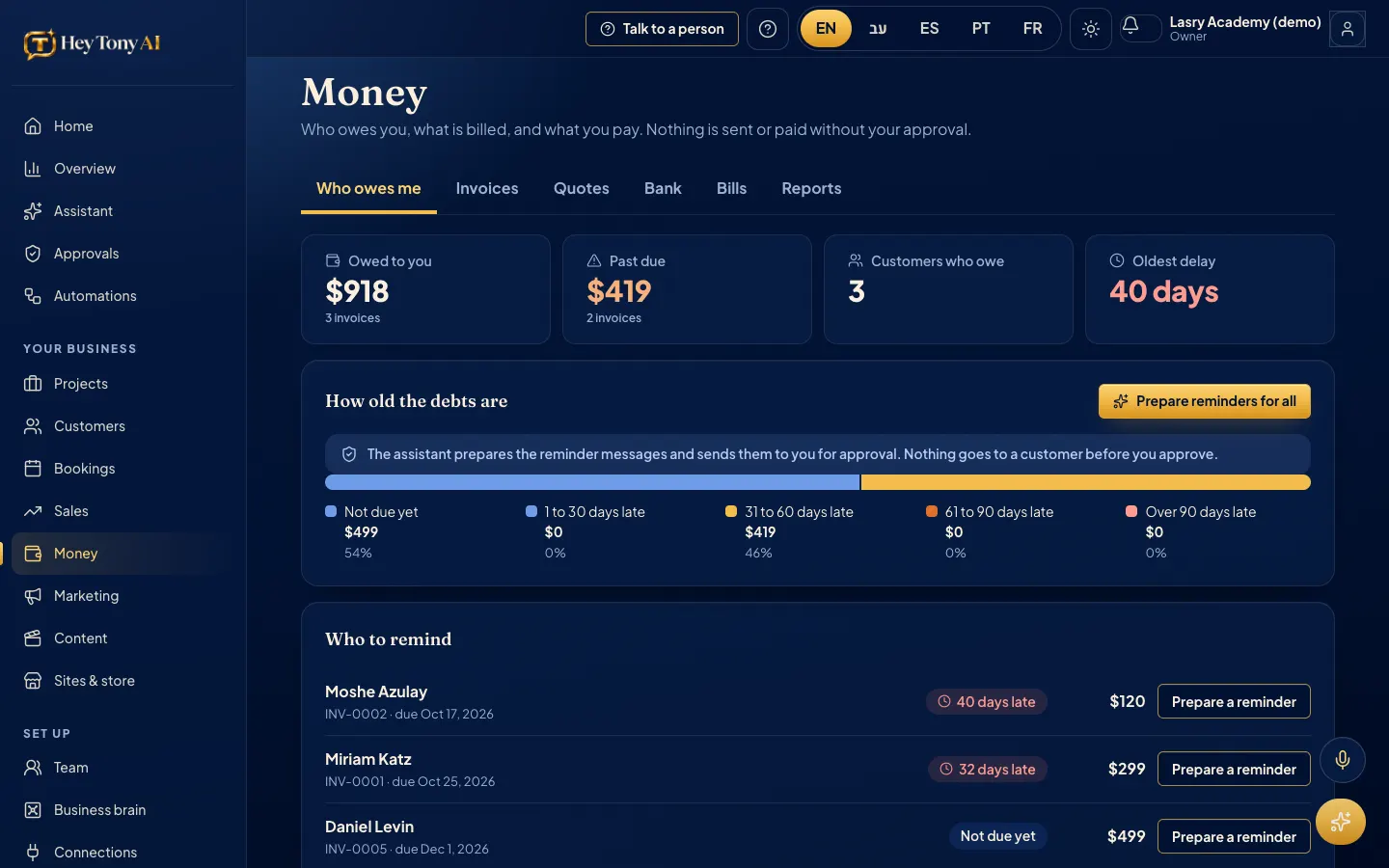
Invoices and quotes in one Money screen. See what's overdue and by how long, and let Tony prepare the reminders.

  • Invoices with paid and overdue tracking
  • Quotes that turn into one invoice when accepted
  • Reports and CSV export for your accountant
Money screen: $918 owed across 3 invoices, debts by age, and a Prepare a reminder button for each customer

Every customer in one list

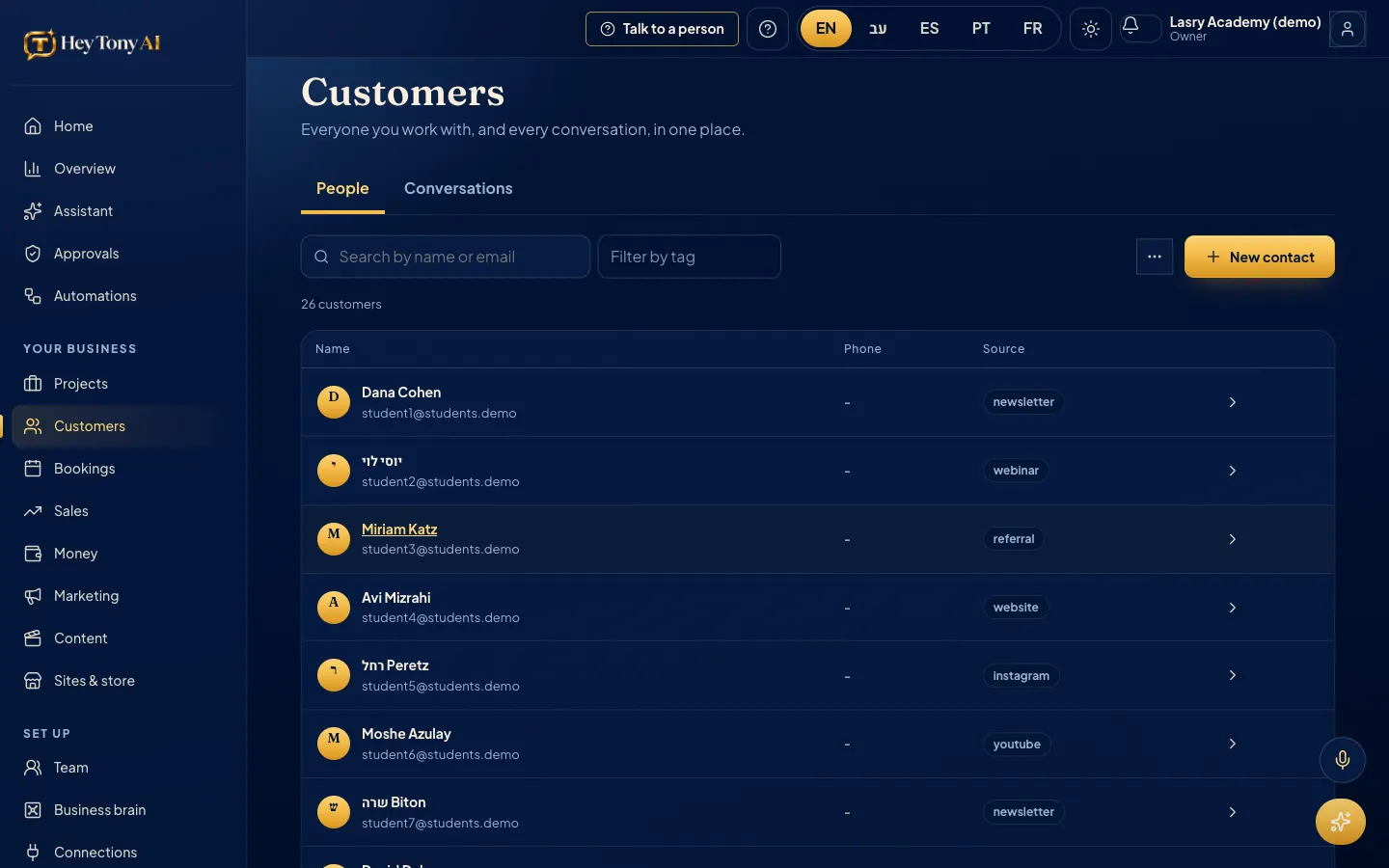
Contacts, companies, tags, deals and the full history of each customer. Bring your existing list with a CSV file.

  • Import a CSV with a dry run first, so nothing is written until you confirm
  • Find and merge duplicates without losing history
  • A sales pipeline you can shape to your business
Customers screen with the list of contacts

Routines that run on their own

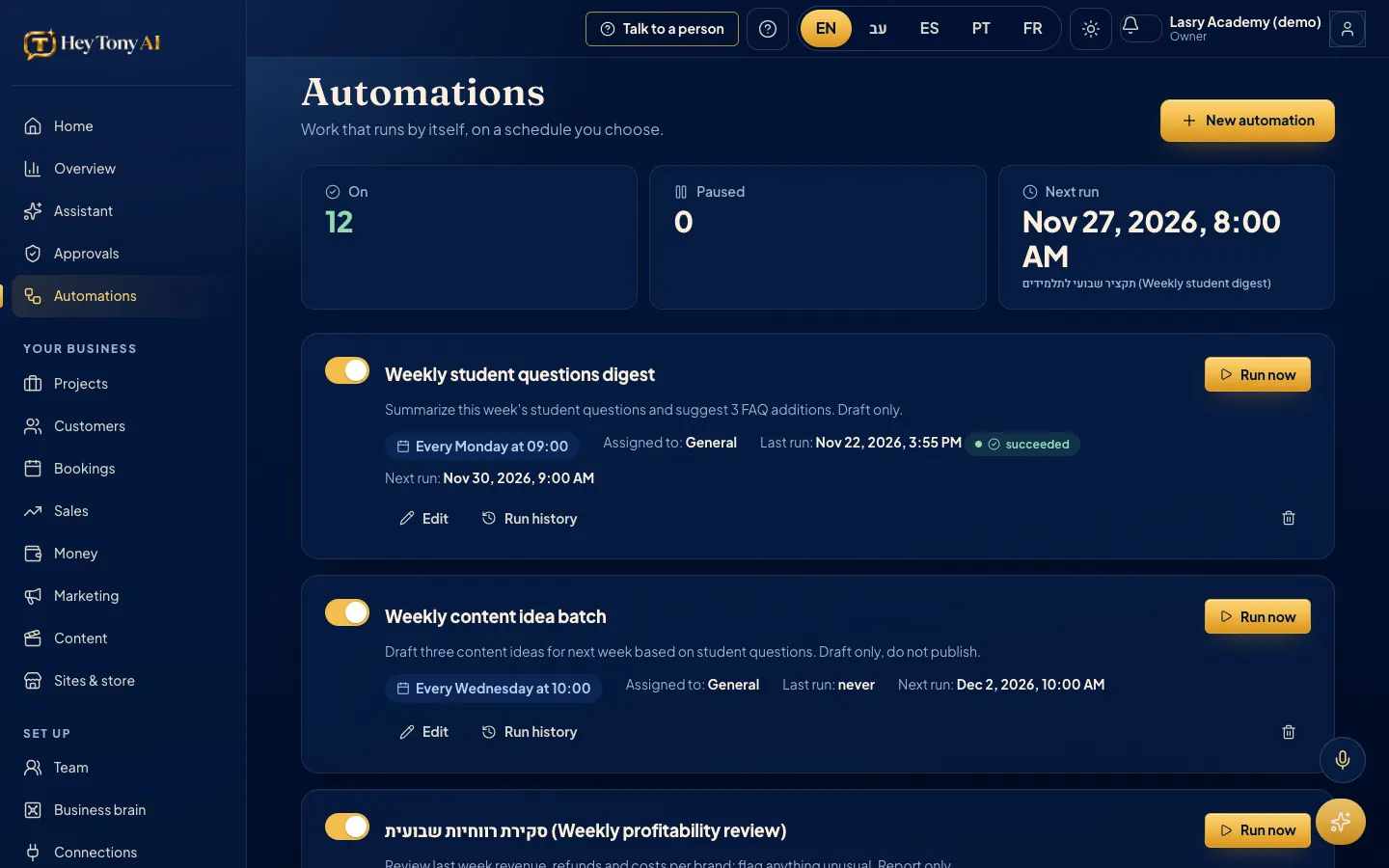
Weekly digests, monthly reviews, a morning brief: set the day and hour once, in your time zone. Pause, edit or run any of them now.

  • Daily, weekly, monthly or one-time
  • Safe retries, never a double run
  • Anything that would reach a customer still waits for you
Automations screen: 12 active routines with their schedule, last run and next run

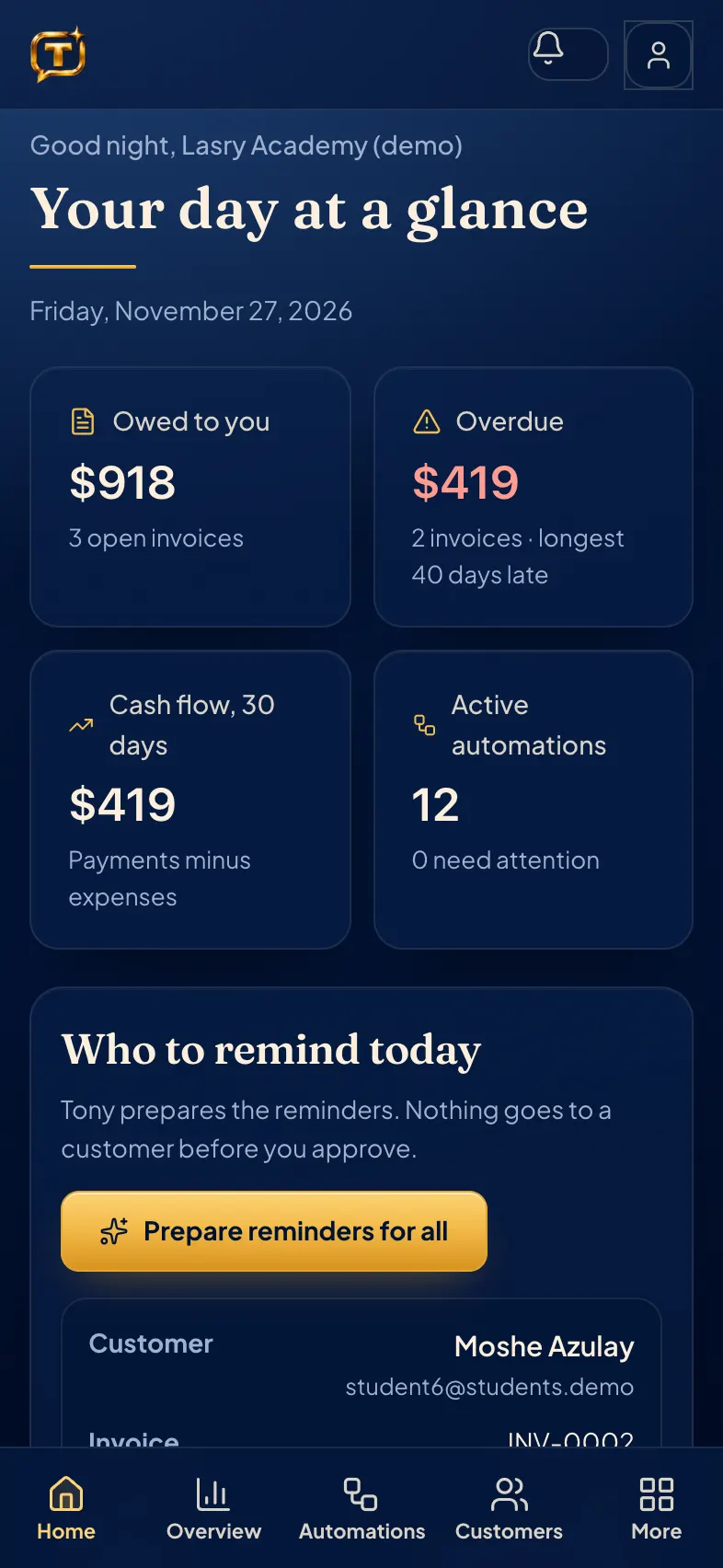
Your day at a glance

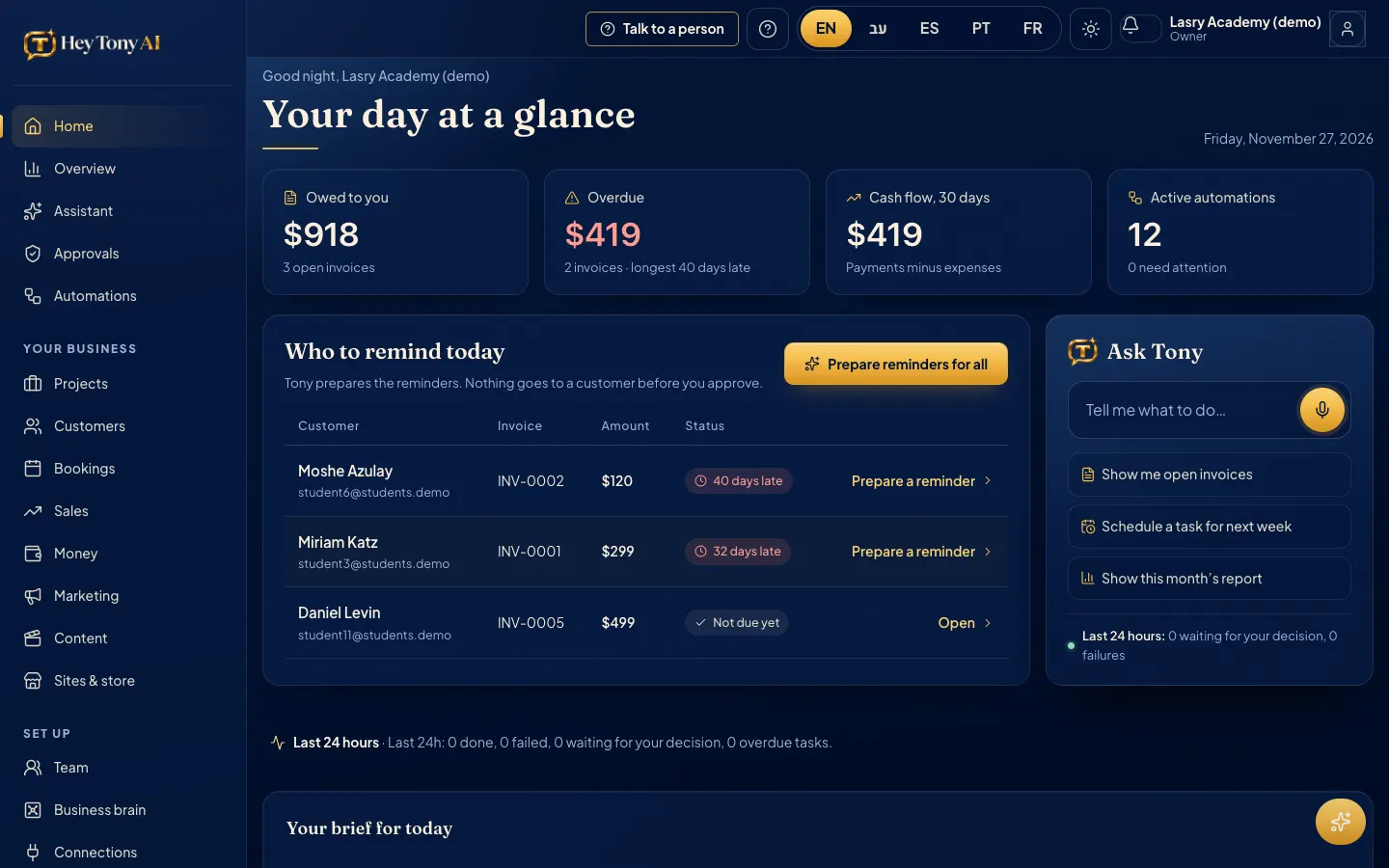
The home screen shows what you're owed, what's late, 30-day cash flow and your active routines, with today's "who to remind" list right beside Ask Tony.

  • A morning brief at the hour you choose
  • Ask Tony about the numbers in plain words
Home screen: owed, late, 30-day cash flow and active automations, a who-to-remind table and the Ask Tony card

See how it works

From "who owes me?" to a reminder you approve

This is a real flow in the app today. Type it, or press the mic and say it.

Show my open invoices
TonyYou have 3 open invoices, $918.00 in total. Pick one and I will prepare a reminder:
  • INV-0002 · Moshe Azulay · $120.00 · 40 days late
  • INV-0001 · Miriam Katz · $299.00 · 32 days late
  • INV-0005 · Daniel Levin · $499.00
Reminder for invoice INV-0002
TonyI prepared a reminder for invoice INV-0002 ($120.00). Nothing is sent yet: approve it, then press Publish to send it from your Gmail.
Spoken requests show the transcript first. You check it, then send.
  1. Ask in your own words

    Type or press the mic. Tony shows what he heard before anything runs.

  2. Tony prepares the work

    He reads only your business's invoices and writes the reminder with the right name, amount and due date.

  3. You approve

    The draft waits for you. Approve, edit or drop it. Ask twice and he reuses the same draft instead of making a second one.

Automations

Three flows that already work

Each one starts on its own, does the busywork, and stops at the point where you decide.

Overdue invoice reminders

Trigger
An invoice is 1, 7 or 14 days overdue (friendly, firm, final), or you ask Tony "who owes me?"
What happens
Tony drafts the reminder with the right name, amount and due date. He never makes two drafts for the same invoice.
Where you decide
Every reminder waits for your approval. It is sent from your connected Gmail only after you approve it.

Quote follow-up

Trigger
A quote you sent gets no answer for 3 days.
What happens
The quote is flagged for a follow-up (at most twice) and drops off the list once the customer decides. Your weekly sales routine drafts the follow-up messages. An accepted quote becomes exactly one invoice.
Where you decide
Follow-up drafts wait for your approval before anything reaches the customer.

Weekly routines and a morning brief

Trigger
The day and hour you set, in your time zone.
What happens
Tony runs the routine, such as a weekly questions digest or a profitability review, and posts a morning summary of your business.
Where you decide
Pause, edit or run any routine from Automations. Pick the brief's hour or turn it off.

Everything in one app

The full list, with honest labels

One interface for the whole business. Each item says whether it works today, is in beta, or is on the way.

Tony prepares the work, but nothing goes out to a customer and no money moves without your approval.

Money and accounting

  • Invoices and payment trackingAvailableCreate, approve and send invoices; partial payments, receipts and credit notes.
  • QuotesAvailablePrintable quotes that become exactly one invoice when accepted.
  • Who owes me and remindersAvailableOverdue invoices by age; reminder drafts at 1, 7 and 14 days, each waiting for your OK.
  • Expenses and vendor billsAvailableBills go from prepared to approved to paid by you. Tony never moves money.
  • Bank statement import and matchingAvailableUpload your bank's CSV; Tony suggests which payments match which invoices and you confirm.
  • Financial reportsAvailableCash flow, debt aging and CSV exports for your accountant.
  • Online card paymentsBetaPayment provider in test mode; no real charges yet.
  • Live bank connectionComing soonAn automatic bank feed. Until then, CSV import works.
  • Bookkeeping sync (QuickBooks and similar)Coming soonSending entries straight to your accounting software.

Customers and CRM

  • Customer list and historyAvailableContacts, companies, tags and a timeline per customer.
  • CSV import and exportAvailableBring your list with a dry run first; exports are spreadsheet-safe.
  • Sales pipelineAvailableStages you name, from new lead to won or lost.
  • Duplicates and mergeAvailableFind and merge duplicates without losing history.
  • Meetings and follow-up tasksAvailableSee who needs a call and what is overdue.

Marketing and social media

  • Weekly social planBetaTony writes a week of posts and places them on your content calendar as drafts.
  • Publish to FacebookBetaApproved posts go to your Facebook page.
  • Instagram, LinkedIn, X and YouTubeBetaBeing rolled out; some platforms still need a manual step.
  • Brand kitAvailableYour colors, fonts and logos, with a readability check.
  • Hands-off social autopilotComing soonA plan that writes and schedules every week on its own. Publishing will still wait for your OK.
  • Paid ads managementComing soonCampaigns with spending caps.

Content creation

  • Landing pages from a chatBetaDescribe it, get a checked, mobile-ready page with a preview and share link.
  • WebsitesBetaTemplates, staging, publishing with quality checks and instant rollback.
  • Presentations, Word and Excel filesBetaReal .pptx, .docx and .xlsx files from a chat request.
  • AI imagesComing soonGenerating images and graphics for posts.
  • AppsComing soonBuilding simple apps for your customers.

Email and newsletters

  • Emails to customersBetaTony drafts them; they go out from your Gmail after you approve.
  • Answer my emailsBetaReply drafts for customer questions, each waiting for approval.
  • Newsletter draftsBetaTony writes the newsletter for your list; you approve it.
  • Bulk newsletter sendingComing soonSending to large lists through a mailing service.

Calendar and bookings

  • Public booking pageAvailableYour hours and buffers, no double booking, cancel frees the slot.
  • Google Calendar syncBetaBusy times hidden, bookings written to your calendar.

Team and employees

  • Team members and rolesAvailableInvite staff or an advisor as owner, staff or advisor.
  • Access per areaAvailableGive each person only the parts of the app they need.
  • AI specialist teamBetaTony routes work to specialists such as finance, sales and marketing.
  • Shifts, time tracking and payrollComing soonManaging employee hours and pay.

Automations and connections

  • Scheduled routinesAvailableDaily, weekly, monthly or once, time zone aware, with pause and run-now.
  • Approvals centerAvailableOne place for everything waiting for your decision.
  • Morning briefAvailableA daily summary of your business at the hour you choose.
  • Off switch for every connectionAvailableStop any connected account instantly.
  • Google, Facebook, Instagram, LinkedIn and YouTube connectionsBetaBeing rolled out.
  • WhatsApp and online store (Shopify)Coming soonBuilt and tested in our lab; not open to customers yet.

Reports and data

  • Business overviewAvailableOwed, late, 30-day cash flow and active routines on the home screen.
  • Ask Tony about the numbersBetaQuestions in plain words, answers from your own data.
  • Data export and account deletionAvailableExport everything anytime; deletion takes two steps and can be cancelled.
  • Five languagesAvailableEnglish, Hebrew, Spanish, Portuguese and French.

Available works today   Beta built and being tested, may need a connected account   Coming soon not available yet

How to start

Up and running in one sitting

  1. Create your account

    Sign up with your email and confirm it.

  2. Tell Tony about your business

    Pick your type of business (salon, clinic, store, services, real estate and more). Tony sets up a matching pipeline and routines.

  3. Do your first real task

    Import your customers, add an invoice, or just ask Tony "who owes me?"

Questions

Frequently asked questions

What can Tony do?

Almost everything around running a small business, from one chat: customers and CRM, invoices, quotes, expenses and bank statement matching, reports, landing pages and websites, presentations and documents, social posts and newsletters, bookings, team access and scheduled automations. Some of it is in beta and a few things are coming soon; the full list on this page shows the status of each one.

Who is Hey Tony AI for?

Small business owners and their teams who handle customers, billing and follow-up themselves: service providers, salons and spas, clinics and private practices, real estate agents, online stores and course creators.

What can be automated?

Overdue invoice reminders, quote follow-ups, a weekly social posts plan, a daily morning brief, and recurring routines such as weekly digests or reviews. Anything that would reach a customer waits for your approval.

How do I set up an automation?

Open Automations, press New automation, describe the task and pick when it runs (daily, weekly, monthly or once). You can also ask Tony in the chat. Pause, edit or run it now at any time.

Do I need technical knowledge?

No. You use plain words, buttons and lists. There is nothing to install and no code to write.

Does it work on my phone?

Yes. The app works in the browser on any phone, tablet or computer, and you can add it to your home screen. A native iPhone app is being prepared and is not in the App Store yet.

Which languages and integrations are supported?

The app speaks English, Hebrew, Spanish, Portuguese and French. Gmail, Google Calendar, Google Drive, Facebook, Instagram, LinkedIn and YouTube connections are in beta and being rolled out.

Does it connect to my bank and accounting?

Today you upload your bank statement as a CSV file and Tony matches payments to invoices for you to confirm. A live bank connection and syncing to accounting software such as QuickBooks are coming soon. Tony never moves money; payments are always made by you.

Can I import my existing customers?

Yes. Upload a CSV file. A dry run shows what will be added and which rows have problems before anything is saved, and importing again updates existing contacts.

Can I talk to Tony?

Yes. Press the mic, say what you need, check the transcript, then send. Tony can also read his answers aloud. There is no always-listening wake word; the mic is on only while you press it.

Where do I get help?

Inside the app, open Help for short answers or ask Tony. To reach a person, use "Talk to a person" or write to info@haravlasry.com.

Let Tony take the follow-up off your plate.

Create your account and ask your first question in a few minutes.